
You finish a walk, glance at your Fitbit, and it says 3.2 miles. Your friend walked right beside you the whole way, and her app says 2.9. Same path, same pace. So who is right?
Here is the short answer. When you walk without GPS, Fitbit works out your distance with one simple sum:
Distance = number of steps × stride length
Your stride length is set automatically from your height and sex, unless you change it. That means your distance is only ever as good as two numbers: how well the watch counts your steps, and how close its guess about your stride is to the real thing. Get either one wrong and the miles drift.
The good news? The bigger of those two errors is usually the stride guess, and you can fix it yourself in about five minutes with a tape measure or a running track. Let’s walk through how it all works, where it goes wrong, and exactly what to do about it.
Step 1: Fitbit counts your steps
Every Fitbit has a tiny motion sensor called an accelerometer. It feels the little jolt and swing your body makes each time a foot lands. Software then decides which bumps are real steps and which are just you waving your arms about.
On a wrist, the tracker is really feeling your arm swing, not your feet. Most of the time that works well, because your arms swing in rhythm with your legs. Researchers who reviewed dozens of studies found that step counting is the thing these trackers do best: a 2015 systematic review in the International Journal of Behavioral Nutrition and Physical Activity found high agreement between Fitbit step counts and the real number in lab tests, but noted that very few studies had even checked distance (Evenson et al., 2015).
“Best” is not the same as “perfect”, though. A larger 2018 review of Fitbit accuracy pooled 191 lab comparisons and found only 46% landed within 3% of the true step count. Fitbit tended to count too few steps in controlled tests, but slightly too many in everyday life (Feehan et al., 2018).
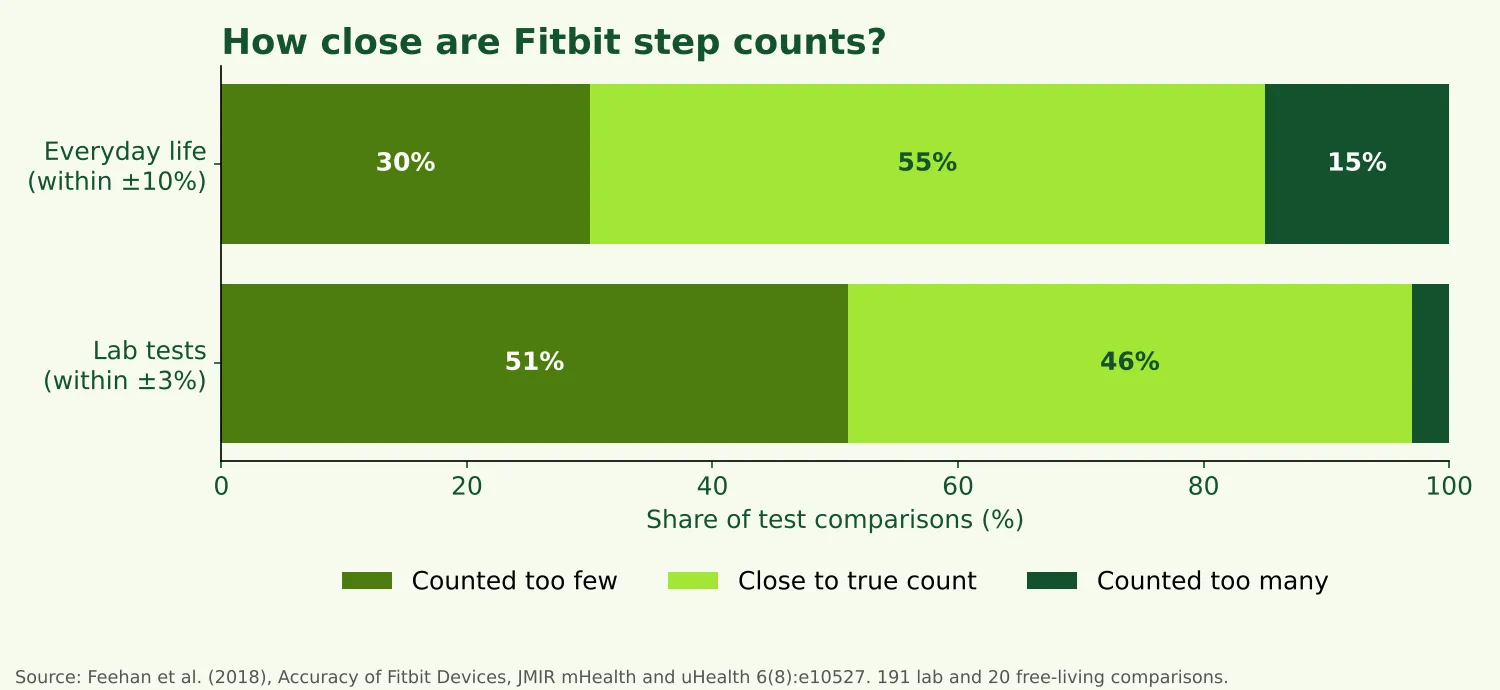
So the step count is a decent estimate, not a perfect tally. Now for the part that matters even more for your miles.
Step 2: Fitbit multiplies by your stride length
Fitbit’s own help page says your stride length “is determined by your height and sex”. It keeps two separate settings: one for walking and one for running, because your steps get longer when you speed up.
A quick note on words. Fitbit calls it “stride length”, but what it actually means is the distance covered by one step, from where one foot lands to where the other lands. (Fitbit’s own instructions ask you to divide a distance by the number of steps you took, which gives you step length.) On MyStepsToMiles we call it step length, but it’s the same number.
Fitbit doesn’t publish its exact formula. A widely used rule of thumb, which our calculator’s Better mode also uses, puts step length at about 41.3% of height for women and 41.5% for men. Here is what that does to the same 10,000 steps:
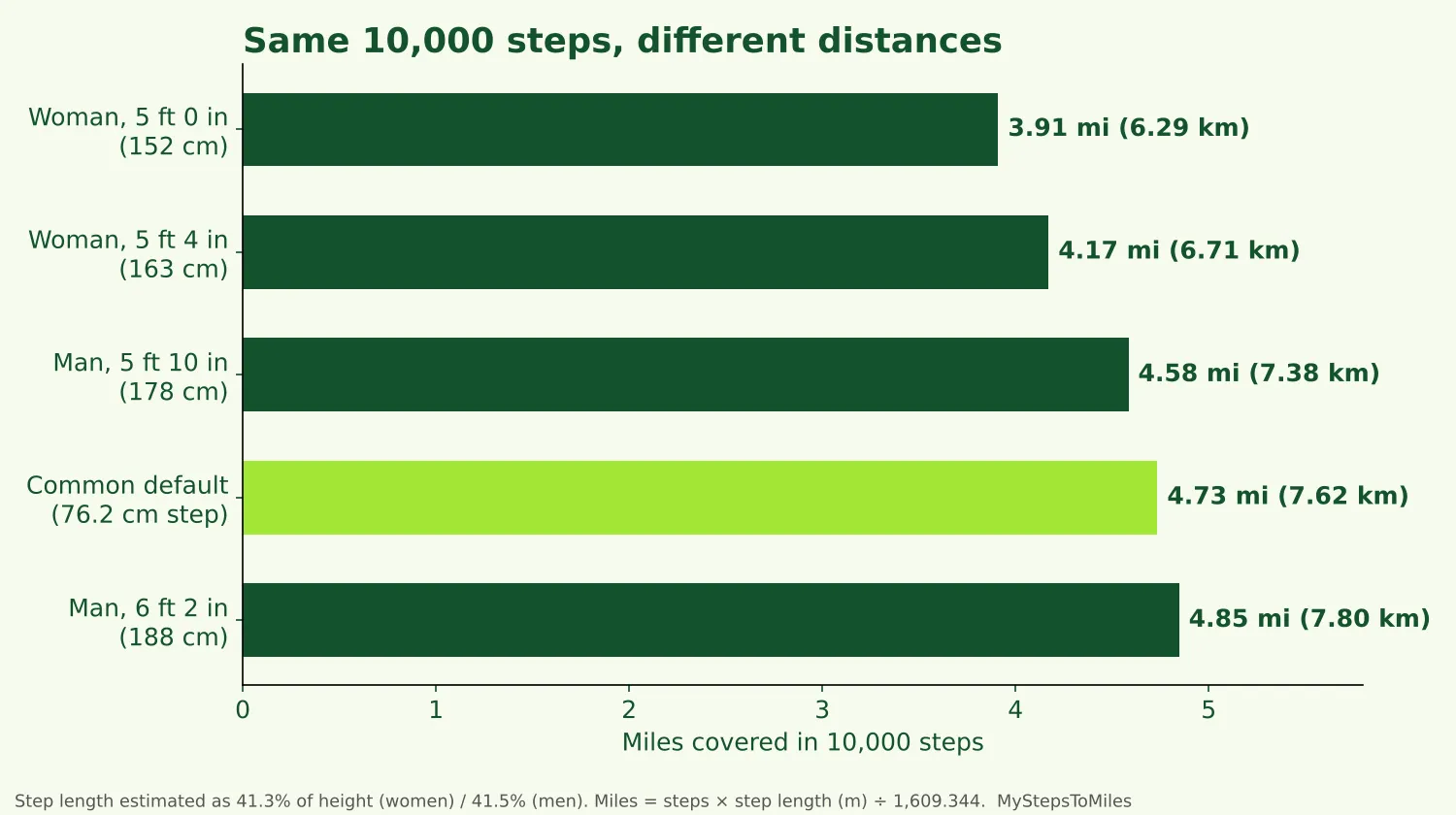
That’s almost a mile of difference between a 5 ft woman and a 6 ft 2 in man, for the exact same step count. If you want to see the full breakdown for an average step, our 10,000 steps to miles page covers it in detail.
And this is the heart of today’s question. Fitbit isn’t measuring how far you walked. It’s estimating, using a stride it assumed from your height.
Why your Fitbit distance can be off
Height is only a rough guide to how long your steps really are. Two people of exactly the same height can walk very differently. Here are the most common reasons the miles drift:
- Your real stride doesn’t match the guess. Long legs for your height, a short, quick shuffle, or a slower pace on a tired day all change your step length. The formula can’t know any of this.
- Your height or sex is set wrong in your profile. It sounds obvious, but a profile filled in years ago, or set in the wrong units, quietly throws every walk off.
- Your arms aren’t swinging. A small 2022 study found wrist trackers, including a Fitbit, undercounted steps when people pushed a shopping trolley or a buggy, sometimes missing most steps (Jones et al., 2022). Fewer steps counted means fewer miles.
- Your arms are moving but your feet aren’t. Clapping, cooking, or a bumpy drive can sneak in extra steps.
- Hills, stairs and crowds. Your steps shorten going uphill, on stairs, and when you’re weaving through a busy market. Fitbit still multiplies by your normal stride.
- Treadmill walking. Step length on a treadmill tends to be shorter than over ground, so treadmill distance on your wrist often reads a little high.
Worked example: Priya, 5 ft 4 in
Priya is 163 cm tall. The rule of thumb gives her a step length of about 67.1 cm. But when she measures her real walking step, it’s 62 cm. She likes an easy, relaxed pace.
- Fitbit’s guess: 10,000 × 0.671 m ÷ 1,609.344 = 4.17 miles (6.71 km)
- Her real distance: 10,000 × 0.62 m ÷ 1,609.344 = 3.85 miles (6.20 km)
That’s about 8% too high, every single day. Over a month of 10,000-step days, Priya’s watch would credit her with nearly 10 miles she never walked. If you’re training for a charity walk, that adds up.
What about GPS?
If your Fitbit has built-in GPS, or uses your phone’s GPS, and you start an exercise like a walk or run, it switches methods. It measures distance from the GPS signal instead of from steps, according to Fitbit’s help pages. If you start moving before the GPS connects, it fills the gap using your steps until the signal locks on.
GPS is usually closer for outdoor walks in open spaces. It can struggle between tall buildings, under heavy tree cover, and indoors. A handy bonus: after a GPS-tracked run, Fitbit automatically updates your running stride length. Your walking stride doesn’t update this way, so it’s worth setting that one yourself.
How to fix it: measure your own stride in 5 minutes
This is the single best thing you can do for accurate miles, on any tracker. Fitbit recommends walking a known distance for at least 20 steps. Here’s an easy way to do it:
- Find a known distance. A running track (one lap of the inside lane is 400 m), a football pitch, or a straight stretch you measure with a tape measure. The longer the better.
- Walk it at your normal, everyday pace. Don’t try to take big steps. Count every step, starting on your first one.
- Divide the distance by your steps. Say you walk 14 metres in 20 steps: 14 ÷ 20 = 0.70 m, or 70 cm.
- Do it two or three times and take the average. One walk can be a bit off.
- Save it. In the app, go to your profile, then Settings, then Activity, then Stride Length, and type in your walking value. (Fitbit’s settings now sit inside the Google Health app, and menu names can change a little between versions.)
Once you have your number, keep it. It’s useful everywhere, not just on your Fitbit. Pop it into the Exact mode on the MyStepsToMiles calculator (the “your own stride” option) and you can turn any step count into miles, kilometres and walking time, no app or sign-up needed.
With a 70 cm step like the one in point 3, 8,000 steps works out to 3.48 miles (5.6 km). That’s a number you can actually trust.

Quick tips for more accurate Fitbit miles
- Check your profile first. Make sure your height is right and in the units you expect.
- Set your walking stride yourself. Let GPS runs take care of your running stride.
- Wear it on your non-dominant wrist and tell the app which wrist you use, so stirring a pot is less likely to count as steps.
- Pushing a buggy or trolley? Expect fewer steps to be counted. A clip-on tracker at the waist or a phone in your pocket can do better here.
- Use GPS for outdoor walks when you want a precise distance for one specific route.
- Compare, don’t obsess. Even with small errors, your tracker is great at showing whether today was more active than yesterday. That trend matters more than the exact decimal.
If you like keeping a simple record, the free My Walks log on MyStepsToMiles lets you save each walk, build a streak, and work towards a 30-day milestone, all in your browser.

Frequently asked questions
Does Fitbit use my height to calculate distance?
Yes. Unless you set it yourself, Fitbit sets your stride length from your height and sex, then multiplies it by your step count. If you track an exercise with GPS, it uses the GPS distance instead.
Why does my Fitbit say I walked further than I did?
Usually because your real step is shorter than the stride Fitbit guessed from your height. Extra counted steps from arm movement can add to it. Measuring your own stride and saving it in the app usually fixes most of the gap.
How many steps does Fitbit count as a mile?
It depends on your stride. With an average step of 76.2 cm, a mile is about 2,112 steps. With a 70 cm step it’s about 2,299 steps. Shorter walkers take more steps per mile.
Is Fitbit distance accurate on a treadmill?
It’s often a little high, because most people take shorter steps on a treadmill than outdoors, while Fitbit still uses your normal walking stride. The treadmill’s own display is a useful cross-check.
Should I set my Fitbit stride length manually?
If accurate miles matter to you, yes. It takes a few minutes and it’s the biggest single improvement you can make. Fitbit updates your running stride after GPS runs, but setting your walking stride is up to you.
Try it yourself
Grab today’s step count from your Fitbit and pop it into the MyStepsToMiles calculator. Try Quick mode first, then Better mode with your height, then Exact mode with your own measured stride. Watching the three answers side by side is the easiest way to see just how much your stride changes the miles. Choose a walking pace of 2, 3 or 4 mph and it’ll tell you how long the walk took, too.
Want a few ready-made comparisons? Have a look at our 5,000 steps to miles, 8,000 steps to miles or 12,000 steps to miles pages.
Sources
- Fitbit / Google Health Help, “How does my device calculate distance?”: https://support.google.com/googlehealth/answer/14237111?hl=en
- Evenson KR, Goto MM, Furberg RD (2015). Systematic review of the validity and reliability of consumer-wearable activity trackers. International Journal of Behavioral Nutrition and Physical Activity 12:159. https://doi.org/10.1186/s12966-015-0314-1
- Feehan LM et al. (2018). Accuracy of Fitbit Devices: Systematic Review and Narrative Syntheses of Quantitative Data. JMIR mHealth and uHealth 6(8):e10527. https://mhealth.jmir.org/2018/8/e10527
- Jones EC et al. (2022). Validity of wrist-worn step counting monitors during activities limiting arm swing. International Journal of Exercise Science: Conference Proceedings 16(1). A small conference study of 12 adults, so treat it as an early finding. https://digitalcommons.wku.edu/ijesab/vol16/iss1/327