
You finish an evening walk, open the Health app and see it: 8,000 steps, 3.4 miles. Your friend walked every one of those steps beside you, yet her phone says 3.8 miles. Same route, same time, different answer. So which phone is right?
Here’s the short version. Your iPhone counts your steps with its built-in motion sensors. It then estimates how long each step is, mostly from your height and how fast you’re moving, and multiplies the two. The step count is usually fairly close. The distance is an educated guess, and that guess can be quite a long way off for some people.
The good news: once you understand how the guess is made, a few quick settings (and one simple check) can make your numbers far more trustworthy. Let’s walk through it.
Where to find steps and distance in Apple Health
Open the Health app, tap Browse, then Activity. You’ll see two separate entries:
- Steps: the number of steps your phone (or Apple Watch) has counted.
- Walking + Running Distance: Apple’s estimate of how far those steps took you.
If you’d like both on your home screen, open each one and tap “Add to Favourites”. They’ll then appear on the Summary tab every time you open the app.
There’s also a third number worth knowing about. Under Browse → Mobility, iPhone 8 and later models show Walking Step Length: the phone’s estimate of the distance from one foot landing to the other. That single number sits at the heart of every mile Apple Health reports.
Step one: how your iPhone counts steps
Inside your phone is an accelerometer, a tiny sensor that feels movement. Each time you take a step, your body rises and falls in a small, regular rhythm. The phone picks up that rhythm and counts each bounce as a step.
It works best when the phone moves with your body. Apple’s own guidance on its walking metrics says estimates are most reliable when the iPhone is “closely coupled to the body”, such as in a trouser pocket or on a belt, rather than in your hand, a backpack or a handbag (Apple, Measuring Walking Quality Through iPhone Mobility Metrics). A phone swinging in a bag sees a messier signal, so it can miss steps or count odd jolts.
So the count isn’t perfect, but it’s a solid starting point. The bigger question is what happens next.
Step two: how steps become miles
This is the part most people never see. Distance is simply:
Distance = number of steps × length of each step
Your phone knows the first number. The second one, step length, it has to estimate. Apple explains that its step-length figure comes from a model based on your height, along with how quickly and how often you step while walking on flat ground. If you haven’t told the Health app your height, it has much less to go on.
And when GPS is available, for example during an outdoor walk recorded on an Apple Watch, Apple says the device learns your stride length at different speeds, which improves distance estimates later on, even when GPS isn’t available (Apple Support).
A worked example
Let’s use the same 8,000 steps and two different step lengths.
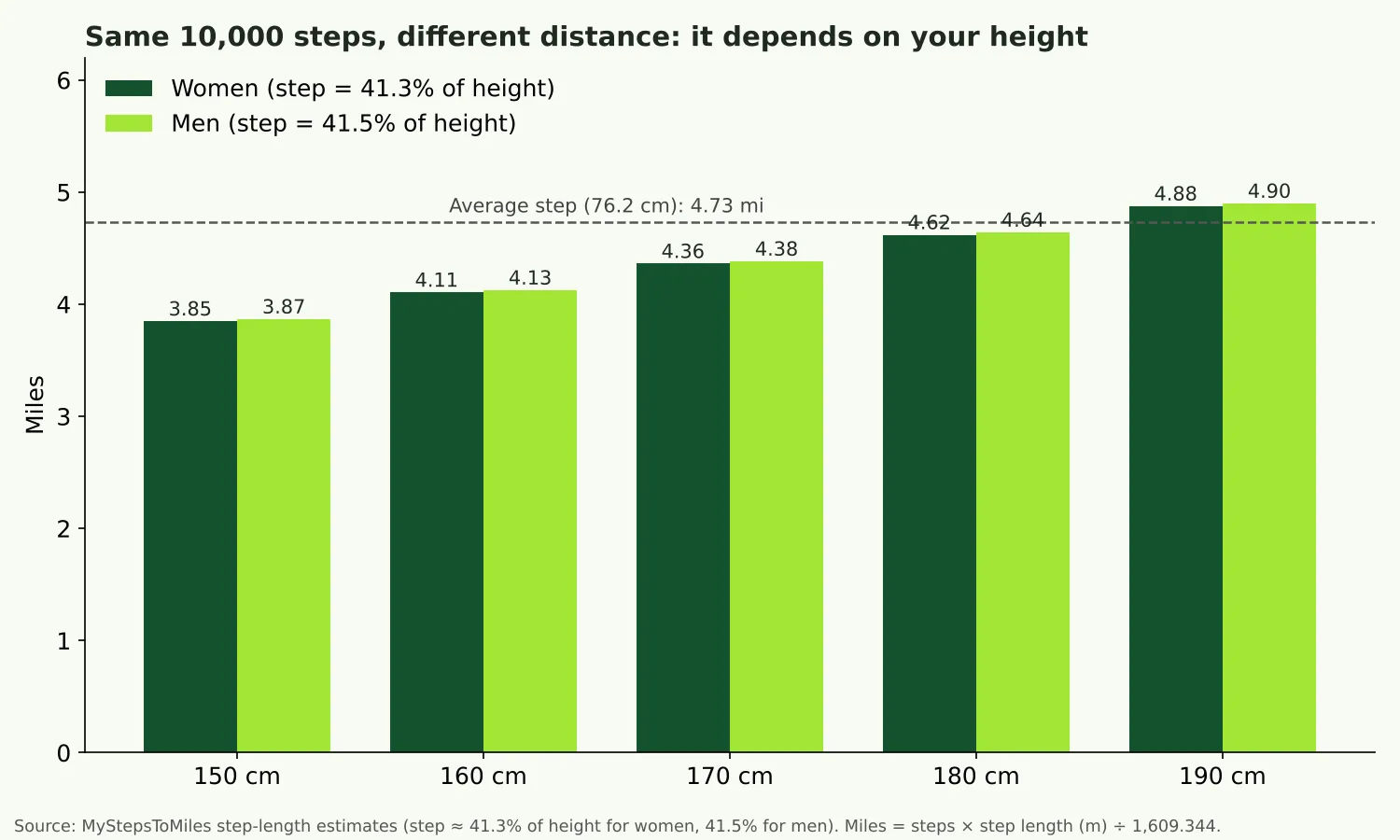
- Using the average step (76.2 cm, or 2.5 ft): 8,000 × 0.762 m = 6,096 m, which is 6.10 km or 3.79 miles.
- For a woman who is 165 cm tall: women’s step length is roughly 41.3% of height, so about 68.1 cm. 8,000 × 0.681 m ≈ 5.45 km, or 3.39 miles.
Same steps, a difference of about 0.4 miles. Neither phone is “broken”; they’re simply working from different step lengths. That’s why two people on the same walk can see different distances, and why the answer to “how many steps is a mile?” is never one number for everyone. On average it’s about 2,112 steps, but a 150 cm walker takes nearer 2,600, while someone 190 cm tall needs only about 2,050.
Why your iPhone distance might look wrong
If your miles seem too high or too low, one of these is usually the reason:
- Your height is missing or wrong. If your height is blank or out of date in Health, the phone can’t size your steps properly.
- Where you carry the phone. In a bag or swinging in your hand, the phone reads your movement less cleanly.
- Your pace keeps changing. Ambling round the shops or walking with small children means shorter steps than a brisk walk, and the estimate may not keep up.
- You walked on a treadmill. Treadmill steps tend to be shorter than steps over ground, and there’s no GPS indoors to correct things.
- Two devices, one total. If you wear an Apple Watch and carry your iPhone, Health picks one source using a priority list. Apple’s support page explains that when several sources record the same thing, the one at the top of the list takes priority.
- Calibration is turned off. If Motion Calibration is switched off, the phone can’t use GPS to learn your real stride.
What the research says
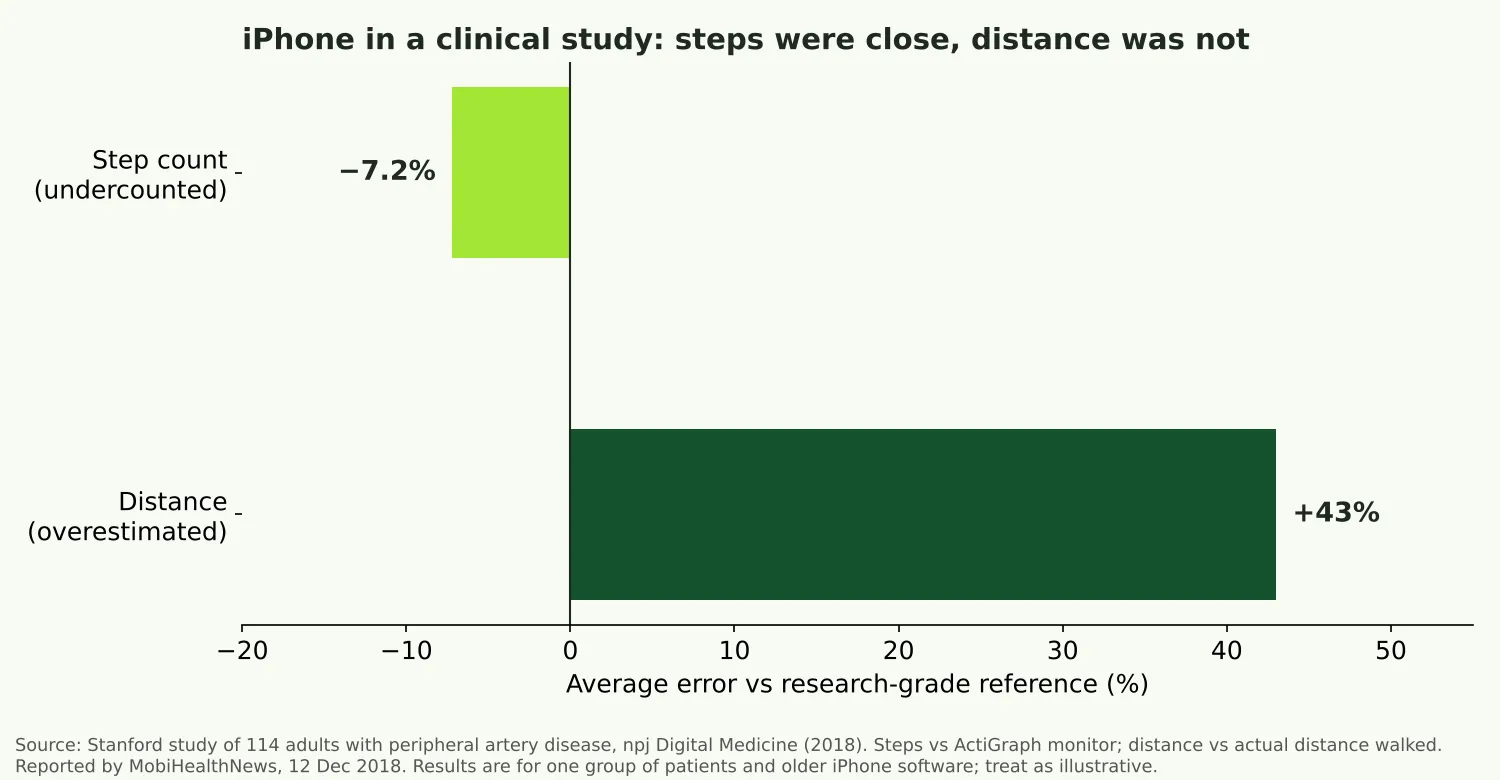
Scientists have tested this. A Stanford team, publishing in the journal npj Digital Medicine in 2018, compared iPhone readings with a research-grade activity monitor in 114 adults with peripheral artery disease (a condition that narrows the arteries in the legs). On average the iPhone undercounted steps by about 7%, but overestimated distance by about 43%. The researchers put the distance problem down to the phone applying the wrong stride length (npj Digital Medicine, 2018).
It’s fair to say this was one group of patients, people whose walking is often affected by their condition, tested on older iPhone software. Your own results could be much closer. But it shows a pattern worth remembering: the step count is generally the more reliable number, and distance is the part to double-check.

6 ways to make Apple Health distance more accurate
- Add your height. Open Health, tap your profile picture in the top right, then Health Details → Edit, and check your height. This is the single biggest fix for most people.
- Turn on Fitness Tracking. Go to Settings → Privacy & Security → Motion & Fitness and make sure Fitness Tracking is on.
- Turn on Motion Calibration & Distance. Go to Settings → Privacy & Security → Location Services → System Services and turn on Motion Calibration & Distance. Apple lists this as the first step for better distance accuracy.
- Keep your phone close to your hip. A front trouser pocket or a belt clip gives the cleanest signal.
- Got an Apple Watch? Calibrate it. Apple recommends doing an Outdoor Walk workout in a flat, open area with good GPS signal, for about 20 minutes at your normal pace (you can split it over several walks). If you walk at different speeds, do 20 minutes at each. If your numbers ever go strange, you can reset this in the Watch app under My Watch → Privacy → Reset Fitness Calibration Data.
- Measure your own step length. This is the most accurate fix of all, and it takes ten minutes. See below.
How to measure your own step length
Find a distance you know. A standard running track is 400 metres around the inside lane, or you can measure a straight stretch of path with a tape measure. Walk it at your normal pace and count your steps. Then divide the distance by your steps.
For example: 400 metres in 540 steps = 0.74 m (74 cm) per step. Do it twice and take the average, because your first lap is often a little self-conscious.
Now you have a step length that belongs to you, not to an average person, and you can use it to check every number your phone gives you.

Double-check your iPhone with MyStepsToMiles
Here’s a simple habit: take the step count from Apple Health (the more reliable number) and do the distance maths yourself. That’s exactly what the MyStepsToMiles calculator is for. It’s free, works in your browser, and there’s no app or sign-up.
Choose the mode that suits you:
- Quick: uses the average 76.2 cm step. Good for a fast ballpark figure.
- Better: uses your height to estimate your step length, much like Apple does, but you can see exactly how it’s worked out.
- Exact: uses the step length you measured yourself. This is the one to trust.
Pick a walking pace (2, 3 or 4 mph) and you’ll see how long the walk took, too. For example, 10,000 steps at the average step length is about 4.73 miles (7.62 km), roughly 1 hour 35 minutes at 3 mph.
If your daily total is smaller, the step-count pages give you the answer at a glance: try 5,000 steps to miles or 8,000 steps to miles. And if you want to keep going, log each walk in My Walks. You’ll build a streak and work towards the 30-day milestone, with a record you control.
Compare the two numbers for a week. If Apple Health is consistently higher or lower than your Exact result, you’ll know how much to adjust in your head, and you’ll know which settings above to check.

Frequently asked questions
Is the iPhone step counter accurate?
For everyday walking it’s usually reasonably close, especially with the phone in a pocket. Studies suggest the step count is more reliable than the distance figure, so treat distance as an estimate.
Why does my iPhone say I walked further than I did?
Most often it’s using a step length that’s too long for you, commonly because your height is missing or wrong in Health, or because Motion Calibration is switched off. Measuring your own step length is the surest fix.
Does my iPhone count steps without an Apple Watch?
Yes. The iPhone counts steps on its own using its built-in motion sensors, as long as you’re carrying it and Fitness Tracking is turned on.
How many steps is a mile on an iPhone?
The phone doesn’t use one fixed number; it depends on your step length. With an average 76.2 cm step it’s about 2,112 steps per mile. Shorter walkers need more steps, taller walkers fewer. See 1,000 steps to miles for a quick reference.
Can I change Apple Health from miles to kilometres?
Yes. Open Walking + Running Distance in the Health app, scroll down and look for the Unit option, then choose kilometres. (On some iOS versions it follows your iPhone’s region settings instead.) The MyStepsToMiles calculator shows both miles and kilometres anyway.
Try it now
Grab today’s step count from your iPhone, pop it into the MyStepsToMiles calculator, and see how close Apple Health really is. It takes about ten seconds, and you might be surprised.
Sources
- Apple, Measuring Walking Quality Through iPhone Mobility Metrics (white paper): https://www.apple.com/healthcare/docs/site/Measuring_Walking_Quality_Through_iPhone_Mobility_Metrics.pdf
- Apple Support, Calibrate your Apple Watch for improved Workout and Activity accuracy: https://support.apple.com/105048
- Apple Support, Manage Health data on your iPhone, iPad or Apple Watch: https://support.apple.com/HT204351
- Stanford study: Clinical validation of smartphone-based activity tracking in peripheral artery disease patients, npj Digital Medicine (2018): https://pmc.ncbi.nlm.nih.gov/articles/PMC6550212/
- MobiHealthNews summary of the Stanford study (12 Dec 2018): https://www.mobihealthnews.com/news/study-iphone-s-step-tracker-solid-don-t-rely-its-distance-measurement-features