
You get home from your evening walk and check your numbers. Your phone says 7,412 steps. Your watch says 8,960. You walked the same route, at the same time, with the same legs. So which one is lying, and did you actually hit your goal?
In short
- At a normal walking pace, most phones and trackers count within a few per cent of your true steps.
- Slow walking and wrist-worn devices are where counts go most wrong.
- Your distance is usually further off than your steps, because apps guess your stride. Measure yours and use Exact mode.
So, how accurate are step counters? At a normal walking pace, most modern phones and fitness trackers count steps to within a few per cent of the true number. That is close enough to trust for a daily goal. They get much worse when you walk slowly, wear the tracker on your wrist, or leave your phone on the desk. And the bigger mistake is usually not the step count at all. It is the distance your app works out from those steps, because it has to guess the length of your stride.
What the research says, in plain numbers
Scientists test step counters by having people walk while someone counts every step by hand (or films it), then comparing that true count with what the devices show. Three studies give a clear picture.
- Phones did well in a lab test. In a 2015 study in JAMA, 14 adults walked 500 and 1,500 steps on a treadmill. Smartphone apps landed between 6.7% under and 6.2% over the true count. The wrist and waist wearables tested ranged from 22.7% under to 1.5% under (Penn Medicine summary).
- Most devices are close, and they lean towards undercounting. A large 2020 review of the research found that in controlled tests, about 45% of comparisons were within ±3% of the true count. When devices were wrong, they mostly counted too few steps. Apple and Samsung devices varied the least.
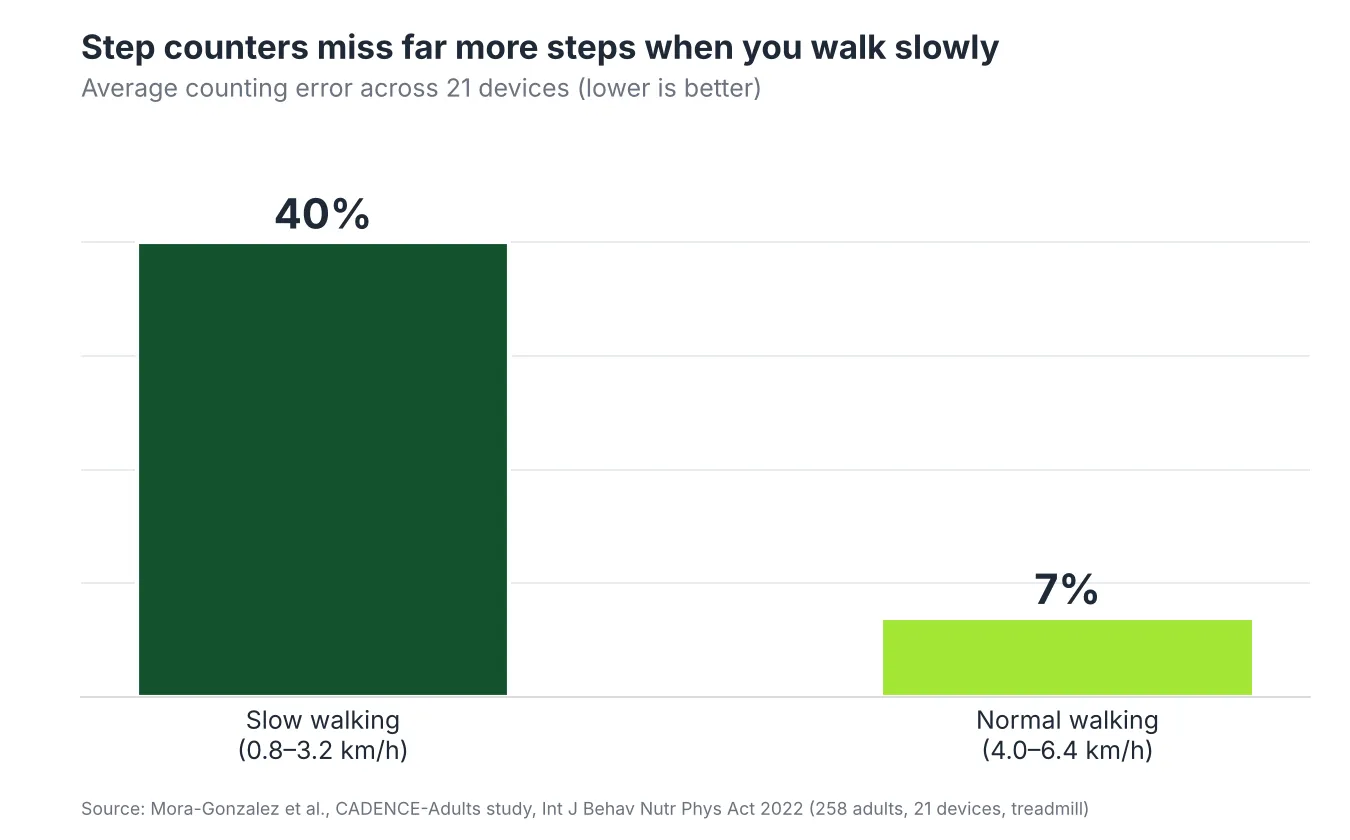
- Speed changes everything. The CADENCE-Adults study tested 21 devices on 258 adults. At normal walking speeds, the average error was about 7%. At slow speeds, it jumped to about 40%.
What does that mean for a real day? On 10,000 steps, a 3% error is 300 steps, roughly 0.14 miles (230 metres) at an average stride. A 7% error is 700 steps, about a third of a mile. Annoying, but it will not make or break your health. The trouble starts when the error is much bigger than that, and there are clear reasons why it sometimes is.
Why your phone and watch disagree: the five usual suspects
1. You are walking slowly
Step counters look for the bump-and-swing rhythm of a confident stride. A slow amble, a shuffle round the supermarket or a gentle stroll with a toddler produces softer movements, and many devices simply miss them. In the CADENCE study, 19 of the 21 devices were noticeably worse at the slowest speed tested than at slightly faster ones. Older adults walking slowly saw the biggest errors.
2. It is on your wrist
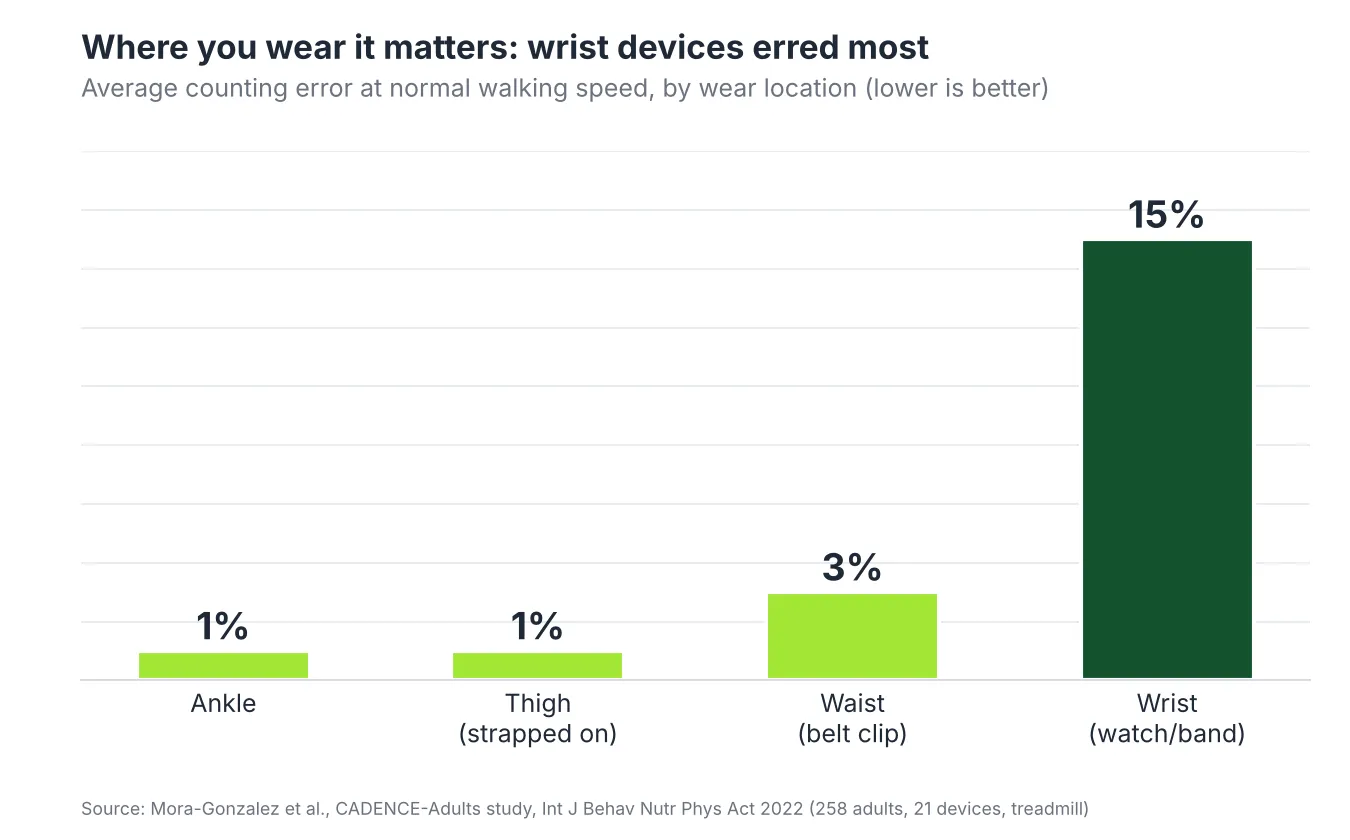
A watch or band does not feel your feet. It feels your arm, and it guesses that each arm swing means a step. When your arms stop swinging, steps go missing: pushing a pram or a trolley, carrying shopping, holding a handrail, or walking with your hands in your pockets. In the CADENCE study, devices worn on the wrist had an average error of about 15% at normal speed, compared with about 3% at the waist. (The study tested both consumer trackers and research devices, so treat these as a general pattern rather than a rating of your exact model.)
3. Your phone was not with you

This is the most common reason for “missing” steps. If your phone sits on the kitchen counter while you cook, tidy up or walk the dog, those steps never happen as far as your phone is concerned. A watch catches them; your phone does not. That alone can explain a gap of a thousand steps or more on a busy day at home.
4. Your device counted things that were not steps
Wrist devices can also add steps. Folding laundry, clapping, brushing your hair or a bumpy bus journey can all look a bit like walking to a sensor on your arm. This is one reason a watch can sometimes show more steps than a phone kept in a pocket.
5. Two brands, two rulebooks
Every company writes its own software to decide what counts as a step. Even if both of your devices are decent, they can reach different totals on the same walk. They are two estimates, so pick one device as your official counter and stick with it.
The bigger problem: your steps are fine, your distance is not
Here is the part most articles miss. Even a perfect step count gives you the wrong distance if your app guesses your stride badly.
Most step-to-distance tools start from an average step length of 76.2 cm (2.5 ft). That gives about 2,112 steps per mile. But your real step length depends a lot on your height. A good estimate is 41.3% of your height for women and 41.5% for men.
Let’s see what that does to the same 8,000 steps:
- Using the average 76.2 cm step: 8,000 steps ≈ 3.79 miles (6.10 km).
- A woman who is 160 cm tall has a step of about 66 cm, so 8,000 steps ≈ 3.28 miles (5.29 km).
- A man who is 183 cm tall has a step of about 76 cm, so 8,000 steps ≈ 3.78 miles (6.08 km).
For the shorter walker, the average-stride answer is half a mile too generous. That is an error of about 15%, which is bigger than the typical step-counting error at a normal pace. So if your walking distance has ever felt “too good to be true”, this is probably why. (See the full breakdown on our 8,000 steps to miles page, and why height matters so much in steps to miles by height.)
The two-minute fix: test your own step counter
You do not need a lab. You need 100 steps and a bit of concentration. Do this once with your phone and once with your watch, if you have both.
- Open your step count and write down the number you see.
- Walk at your normal pace and count 100 steps in your head. Every time a foot lands, that is one step.
- Stop and check the count again. Subtract the first number from the second.
- Work out your error. If the device shows 94 new steps, it is undercounting by about 6%. If it shows 103, it is overcounting by about 3%.
- Repeat it once at a slow pace. If the slow test is much worse, you now know that your gentle strolls are being undercounted.
What to do with the result: within about 5% is excellent; leave it alone. If you are more than 10% off, try moving the device. Keep your phone in a trouser pocket rather than a bag, and wear your watch snugly on your non-dominant wrist. Then test again.
Fix your distance: measure your real stride
Once you trust your step count, the next step is to give your calculator your real stride, not an average one. It takes about five minutes.
- Find a stretch with a known length, such as 20 metres measured with a tape measure, a marked running track, or the length of a sports pitch.
- Walk it naturally, as you normally would, and count your steps.
- Divide the distance by the number of steps. For example, 15 metres in 20 steps = 0.75 m per step.
- Do it two or three times and use the average.
Now put that number to work. In the MyStepsToMiles calculator, choose Exact mode (“your own stride”). It asks for the distance of 10 steps, so for a 0.75 m step enter 7.5 metres. Your 8,000 steps become 6.0 km, or 3.73 miles. No measuring tape handy? Use Better mode, which estimates your stride from your height. Quick mode uses the 76.2 cm average and is fine for a rough idea.
You can also pick a walking pace of 2, 3 or 4 mph to see how long a walk will take. For example, 10,000 steps at the average stride is about 4.73 miles, roughly 1 hour 35 minutes at 3 mph (see the 10,000 steps to miles page).

Turn a “good enough” count into progress you can trust
A step counter does not need to be perfect to be useful. It needs to be consistent. These habits make your numbers work for you:
- Choose one official counter. Phone or watch, not both. Comparing them every evening only creates frustration.
- Wear or carry it the same way every day. If your error is steady, it cancels out when you compare this week with last week.
- Watch the trend, not the single day. Walking 6,000 steps a day this month after 4,000 last month is real progress, even if both numbers are a few per cent off.
- Be sceptical about calories. The same 2020 review found that calorie (energy) estimates were far less accurate than step counts, with no brand getting them reliably right. Use steps and distance as your main measure.
- Log your walks. Our free My Walks log keeps track of your distance, builds a streak and celebrates your 30-day milestone, with no app and no sign-up.

If you are starting smaller, our 5,000 steps to miles page shows what that first goal looks like in distance and time.
Frequently asked questions
Is a phone or a smartwatch more accurate for counting steps?
In lab tests at a normal pace, phones carried in a pocket did as well as, or better than, wrist devices. Wrist devices miss steps when your arms are not swinging and can add steps when your arms move but your feet do not. The best device is the one you actually have on you all day.
Why does my step counter add steps when I am sitting or travelling?
Sensors respond to movement, not to feet. Arm movements and vibrations on a bumpy bus or car ride can look like walking, so a few extra steps can creep in on a day you barely walked.
How can I make my step counter more accurate?
Carry your phone in a trouser pocket rather than a bag, wear your watch snugly, keep the same device and position every day, and walk at a steady, purposeful pace when you are walking for exercise. Then do the 100-step test above to see how close you are.
How far is 10,000 steps if my counter is a bit off?
At the average step length of 76.2 cm, 10,000 steps is about 4.73 miles (7.62 km). A 5% counting error changes that by about 500 steps, or roughly a quarter of a mile. Your stride makes a bigger difference, so use your height or your measured stride for a truer answer.
Your next step
Your step counter is probably more honest than you fear. The real gap is usually the distance. Give it two minutes: do the 100-step test, measure your stride, and put both into the MyStepsToMiles calculator in Exact mode. It is free, there is no app to download, and you will finally know how far you really walked.
This article is general information, not medical advice. Talk to a doctor before a big change in how active you are.
Sources
- Case MA, Burwick HA, Volpp KG, Patel MS. Accuracy of smartphone applications and wearable devices for tracking physical activity data. JAMA, 2015.
- Penn Medicine news release. Smartphone apps just as accurate as wearable devices for tracking physical activity. 2015.
- Fuller D, Colwell E, Low J, et al. Reliability and validity of commercially available wearable devices for measuring steps, energy expenditure, and heart rate: systematic review. JMIR mHealth and uHealth, 2020.
- Mora-Gonzalez J, Gould ZR, Moore CC, et al. A catalog of validity indices for step counting wearable technologies during treadmill walking: the CADENCE-Adults study. Int J Behav Nutr Phys Act, 2022.